


Arduino UNO R4 Wi-Fi password connection issues
March 2, 2024
· admin
WiFI
Arduino
Hardware
Networking
IoT
Internet of Things
ASUS
The Arduino UNO R4 Wi-Fi is a great addition to the Arduino family. A fun little board to play with.

TIL311 test program
January 22, 2022
· admin
Arduino
Hardware
Electronic Component
TIL311 are single-digits LED hexadecimal displays with an internal four-bit latch and decoder along with the LED drivers. They come in 14 pins, dual-in-line-package. The characters are made of an 4 x 7 array of red LEDs.
Maximum frequency an Arduino can generate
September 7, 2015
· admin
Arduino
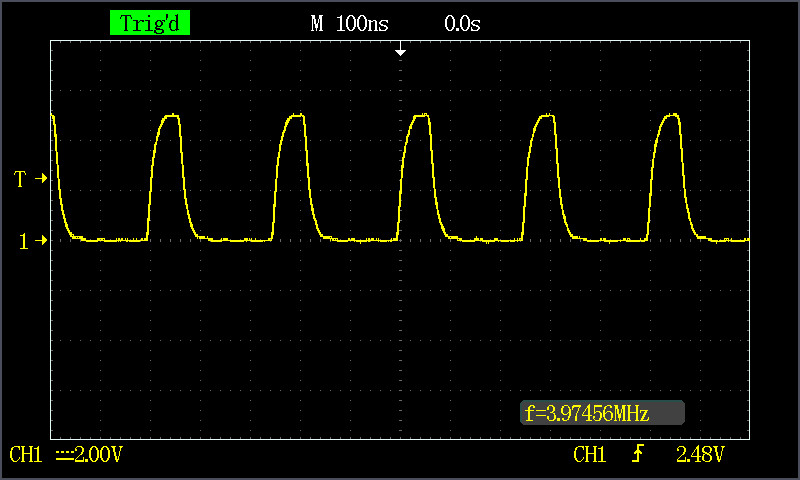
What is the maximum frequency an Arduino can generate? Typically, I obtained a frequency of less than 100 kHz using the Arduino function calls. The results were lower than I expected. I also observed that I had a frequency higher by 25 kHz using a pin from the 8 to 13 pin set than a pin from the 0 to 7 pin set. These tests yield a virtually perfect waveform. I obtained almost 4 MHz by accessing the register directly. The waveform was not as good as the waveform of the first four tests. The waveform is given in Figure 1.
STM32 Minimum System Development Board
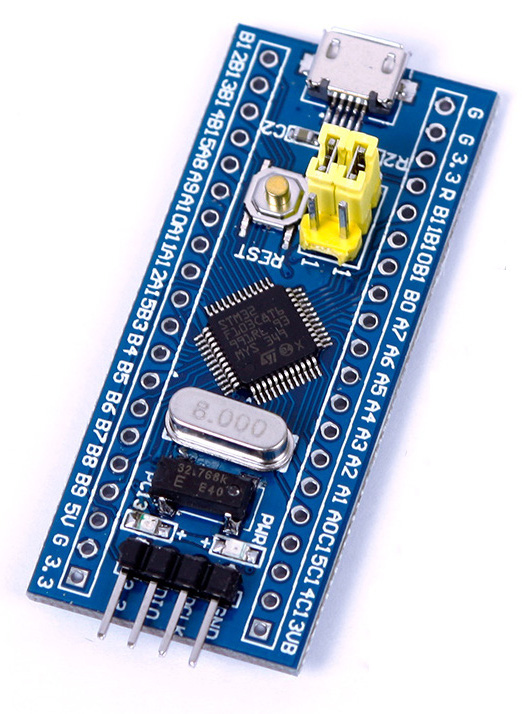
This post describes how to upload code to a STM32 Minimum System Development Board that can be bought from Ali Express or eBay for around $4.00 US. You will be able to compile and upload a led blinking program to the board at the end of this guide. This guide is using Arduino\_STM32 by Roger Clark.
You will need:

An Arduino library for the MAX7219 Led Display Driver.
July 20, 2014
· admin
Arduino
The MAX7219 chip does a wonderful job when its time to drive either a 64 led matrix or an eight digit (seven segments) display. Only three wires are required: a chip select (CS), a data in (DIN) and a clock (CLK). The protocol is simple. I've written an Arduino library that implements this protocol. Specifications can be found at MAX7219.
The library comes with some code examples. Look in the File >> Examples >> CTTMAX7219 sub-menu in the Arduino IDE. Refer to the display and chip manufacturers to hook the display to the MAX7219 chip. This is straight forward. The display will likely need an external supply. If so, make sure that the Arduino board and the chip have a shared ground. You will need to modify the example code to specify the pins used to connect the DIN, CS and CLK pins of the chip to the Arduino. By default, these are:
/ Clock pin on the arduino. /
int pinCLK = 10;
/ Chip select pin on the arduino. /
int pinCS = 9;
/* Data IN on the arduino. /
int pinDIN = 8;
The download link of the library is CTTMAX7219\_v1.0. You can install it through the Arduino IDE using the usual methods. Detailed information can be found at Installing Additional Arduino Libraries.
Trinket Support On Linux
The Trinket (Adafruit's Trinket) can be supported on Linux using the Arduino IDE 1.0.5 in only a few steps.

How to restore the Arduino Bootloader?
It can be easily done using Linux. This procedure is for the 328p processor. It can easily be adapted for a 168 processor. You will need an ICSP. First, make sure that avrdude is installed. It can be installed by issuing the command:
sudo apt-get install avrdude
You will need to retrieve the bootloader. It can be found in the hardware/arduino/bootloaders/atmega directory in the 1.0.5 Arduino IDE download. It is named ATmegaBOOT\_168\_atmega328.hex.

Mounting plate for Arduino UNO/Duemilanove/Diecimila
April 6, 2014
· admin
Arduino
3D Printing
object
A simple mounting plate for the Arduino UNO, Duemilavone, Diecimila, Freeduino or any other compatible boards.
Use #4-40 screws to mount the board on the mounting plate.
Installation of the AVR toolchain on Ubuntu to develop for the Arduino Platform
1. Install Eclipse using "Ubuntu Software Center"
2. Install the AVR Eclipse Plugin using Help >> Install New Software. The source link is <http://avr-eclipse.sourceforge.net/updatesite/>
3. Install the gcc toolchain
Tags
- All
- 3D Printing
- ABS
- Android
- apache
- Arduino
- ARPI600
- ASUS
- automation
- Battlefield
- Blogroll
- Certificate
- Chrome
- Cree
- Cura
- Database
- Debian
- Eclipse
- Electronic Component
- ESP8266
- Firewall
- Games
- GCode
- General
- GIT
- GitHub
- GO2NFC
- Handbrake
- Hardware
- Internet of Things
- IoT
- Java Applets
- Linux
- MAC OS X
- Management
- Mantis
- Marlin
- memcache
- Mountain Lion
- MySQL
- Networking
- NodeMCU
- NVIM
- object
- Octoprint
- openssl
- Photos
- PHP
- phpMyAdmin
- PN532
- postfix
- Prusa Mendel
- Ralink
- Raspberry PI
- RaspberryPI
- Raspbian
- Router
- RT5572
- SSH
- STM32
- Tomcat
- Trinket
- Ubuntu
- Ubuntu 11.04
- Ubuntu 11.10
- Ubuntu 12.04
- Ubuntu 14.04
- Ubuntu 15.04
- Ubuntu 20.04
- Unity
- Unix
- Video
- Virtual Box
- Wheezy
- WiFI
- Windows
- Windows 8
- Wink
- WordPress